Who said what
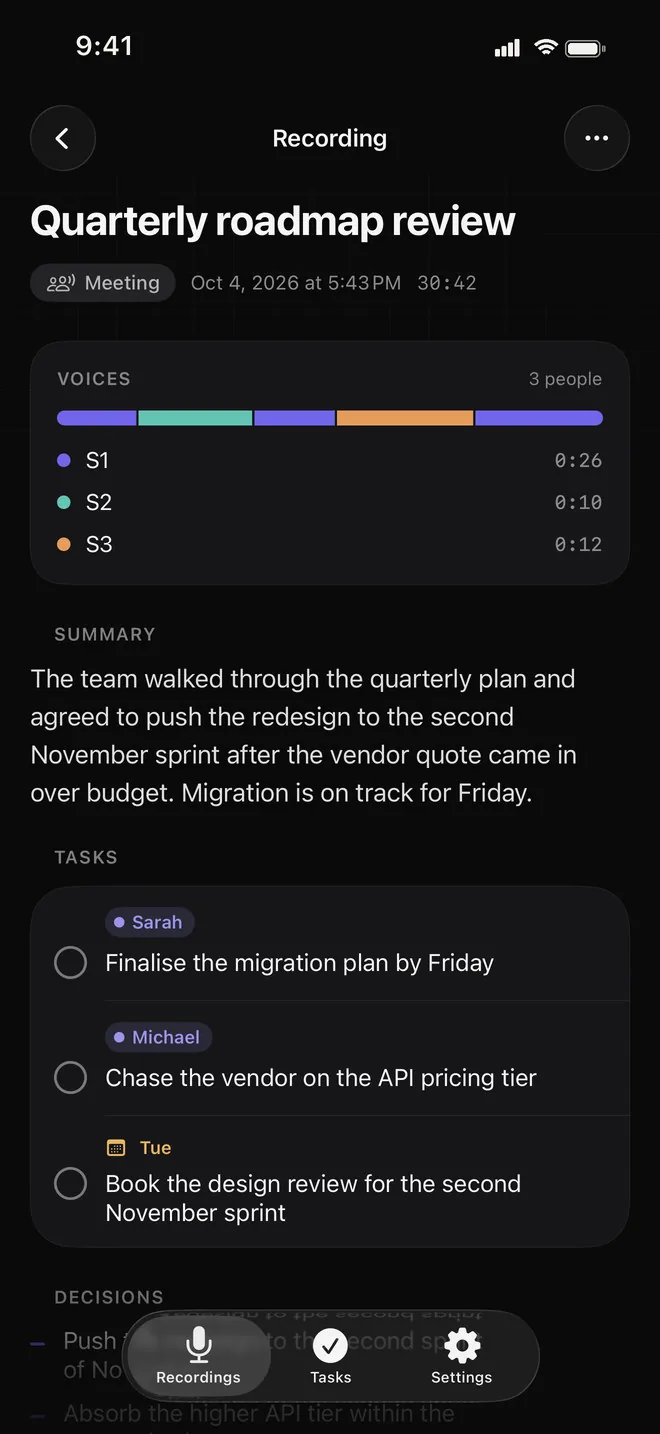
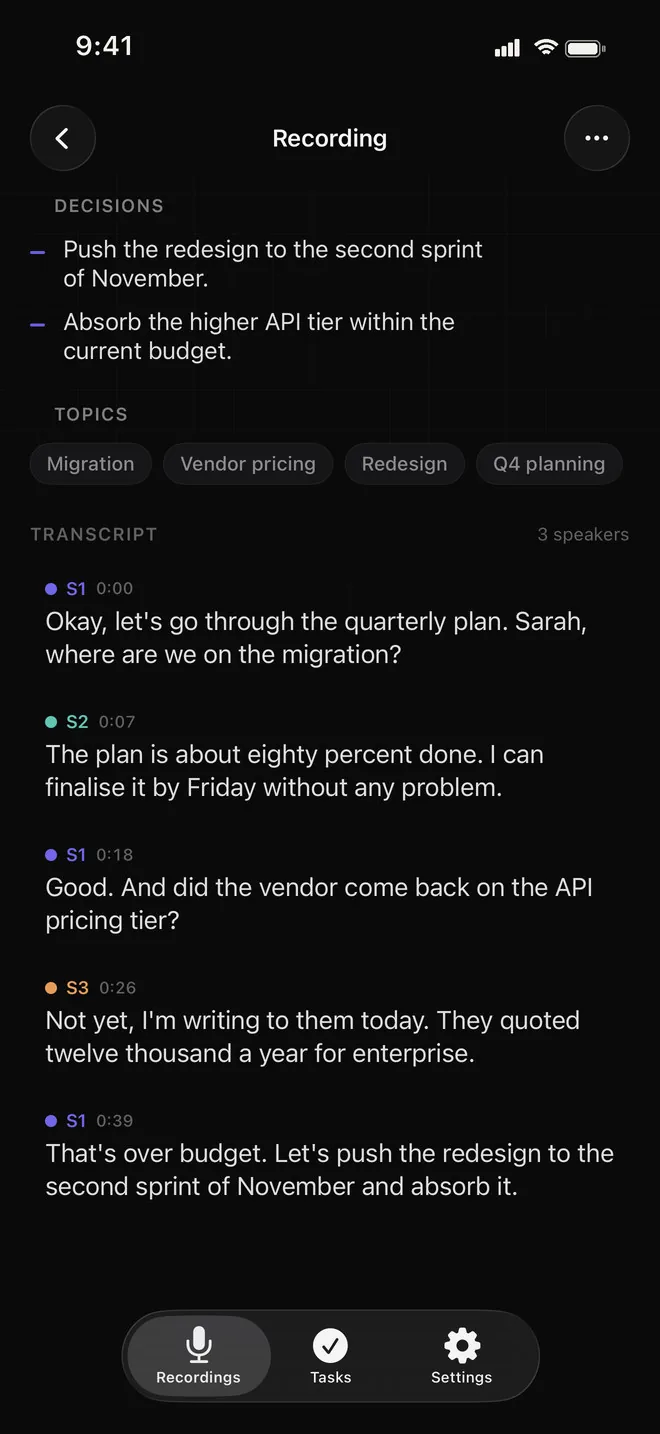
Voca separates the voices and marks every line with the person who said it. Rename a speaker in a tap, or long-press a line to give it to someone else.
Meeting recorder · iPhone, iPad
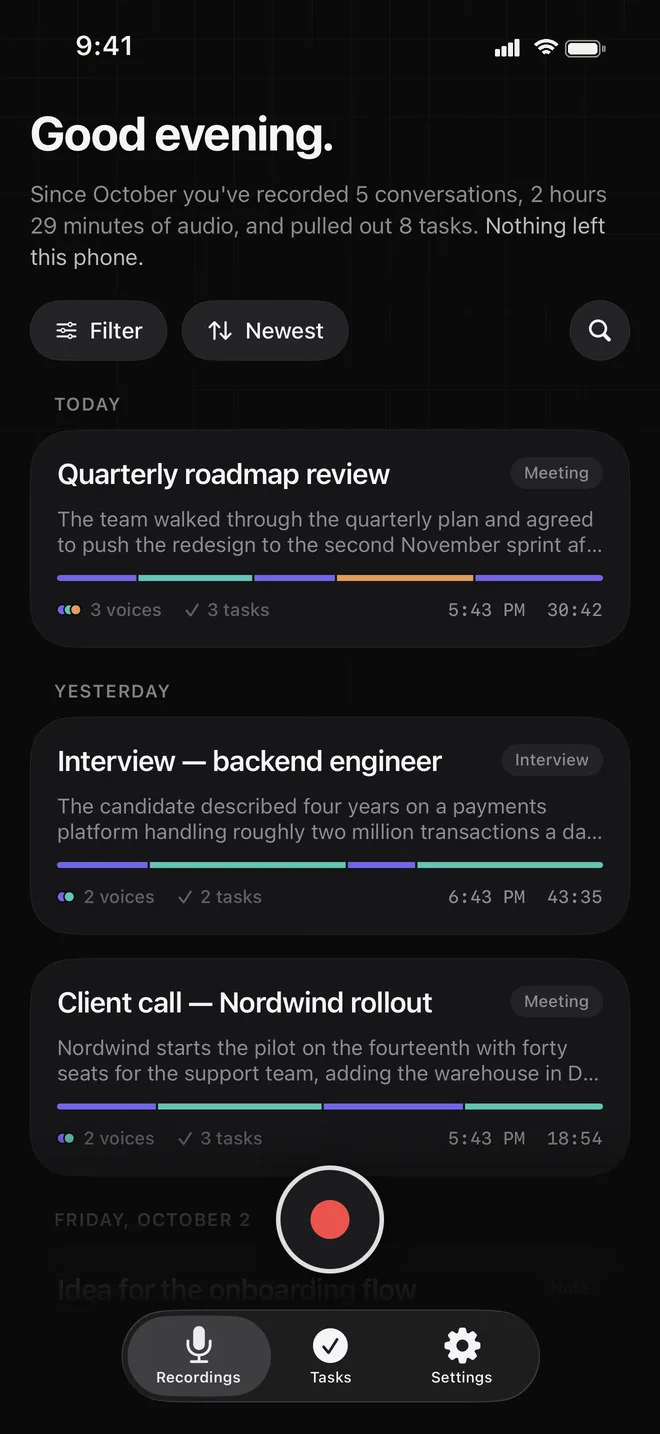
Meetings, interviews, calls. Voca records them start to finish, marks every line with the person who said it, and pulls out what was decided and who has to do what. All of it is worked out on your device.
Download on the App StoreRecording is free, with no limit on length. No account. Requires iOS 26.
Features
Voca separates the voices and marks every line with the person who said it. Rename a speaker in a tap, or long-press a line to give it to someone else.
The text appears word by word while people are still talking. No limit on length and no minutes to buy. Minimise the app and it keeps recording.
Every recording carries a strip in the speakers' colours, so you can see at a glance who held the floor and for how long.
Open the full-screen player and the transcript scrolls with the audio, the current line large and bright. Tap any line to jump there.
A short summary, the decisions and the topics, written by Apple's on-device model. Long meetings are worked through in parts, so length is not a problem.
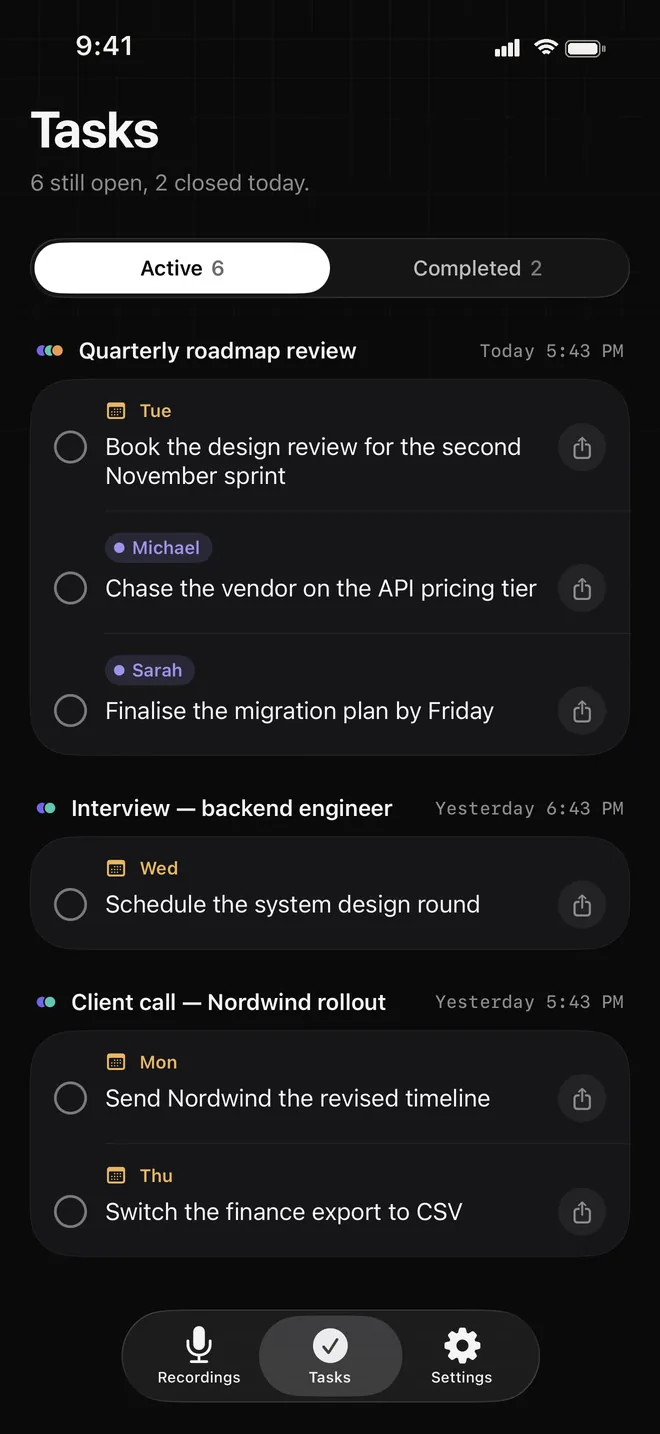
Anything someone commits to shows up in Tasks on its own, grouped by recording, with the owner and the due day when one was said.
A phone call pauses the recording instead of ending it, and connecting or switching AirPods does not stop it. Pick the microphone before you start.
Find the meeting where a name, a number or a deadline came up, across all your transcripts.
Transcript, speakers and summary are all worked out on your iPhone or iPad. No account, no upload. Sync goes through your own iCloud.
See it work
A staged half-minute stand-up with three people, laid out the way Voca shows a real one: who spoke when on top, the transcript following the playhead, and the promises collected into Tasks at the end.
Transcript
Quick one before the launch. Tom, where are we with the build?
The release candidate is done. I'll send it to Apple by Thursday.
The App Store screenshots still need captions. I'll do those tomorrow.
Good. Anything from the beta testers?
Two reports, both about the onboarding. Already fixed.
Then I'll write the release notes tonight and we're set.
Sounds good. Friday, same time?
Anything someone commits to shows up here on its own.
Send the build to Apple by Thursday
Caption the App Store screenshots
Write the release notes tonight
In the app, voices start out as S1, S2, S3 until you give them names. The transcript and speaker labels are free; the summary and tasks come with Pro, and your first three recordings are analysed free.
Transcript
Summary
When you stop, Voca writes up the meeting with Apple's on-device model: no request leaves the phone, and nothing waits on a server queue.
Tasks
"I'll send it by Thursday" turns into a task with the person's name on it. Every recording's tasks land in one list, so nothing said in passing gets lost.
On device
Meetings and interviews are exactly the recordings you should not hand to someone else's cloud. Voca does every step on your own iPhone or iPad.
FAQ
No. Transcription, speaker separation and summaries all run on your iPhone or iPad. There is no account and no Voca server. Transcripts, summaries and tasks sync between your devices through your own iCloud account, which we cannot see; the audio stays on the device that recorded it.
Recording of any length, the live transcript and speaker labels are free, for good. The summary, tasks, decisions and export to PDF or text are Pro. Your first three recordings are analysed free, so you can try it on real meetings first.
iPhone and iPad with iOS 26. Summaries and tasks use Apple's on-device model, so they need a device that supports Apple Intelligence, with Apple Intelligence turned on. Recording, the transcript and speaker labels work without it.
The languages Apple's on-device speech recognition supports, such as English, Spanish, French, German, Italian, Portuguese, Japanese, Korean and Chinese. If a language has no speech model, the recording screen tells you before you start, and you still get the audio.
As long as the meeting. There is no cap on length and no minutes to buy. Long meetings are summarised in parts, so a long recording still gets its summary and tasks.
The recording pauses for the call instead of ending, and continues afterwards. Connecting or switching AirPods does not stop it either.
Yes. Tap a speaker's name in the transcript to rename them, or long-press a line to move it to another speaker.
More apps
Clean, focused tools built for everyday life on iPhone.
 Skyward
Tells you when and where to look tonight — meteor showers, the Moon and planets for your city — with a sky map you hold up to the sky.
Skyward
Tells you when and where to look tonight — meteor showers, the Moon and planets for your city — with a sky map you hold up to the sky.
 Quitwell
Counts the days without it — alcohol, nicotine, vaping or anything you decided to leave behind — with milestones and the money you keep.
Quitwell
Counts the days without it — alcohol, nicotine, vaping or anything you decided to leave behind — with milestones and the money you keep.
 Revera
Restores old photographs — colour, tears and scratches — and leaves the face exactly as it was.
Revera
Restores old photographs — colour, tears and scratches — and leaves the face exactly as it was.
 Surfbreak
Surf forecast for 183 spots across Indonesia — then your Apple Watch counts every wave you ride.
Surfbreak
Surf forecast for 183 spots across Indonesia — then your Apple Watch counts every wave you ride.
 RopeFlow
Jump rope workouts with automatic jump counting, XP, streaks and achievements — for iPhone and Apple Watch.
RopeFlow
Jump rope workouts with automatic jump counting, XP, streaks and achievements — for iPhone and Apple Watch.
 Borderlog
Counts your days in every country — Schengen 90/180, 183-day tax residency and visa rules for 200+ countries.
Borderlog
Counts your days in every country — Schengen 90/180, 183-day tax residency and visa rules for 200+ countries.
 iCurrency
Currency converter for 160+ currencies and top crypto with live rates and offline mode.
iCurrency
Currency converter for 160+ currencies and top crypto with live rates and offline mode.
 Followly
See who unfollowed you on Instagram — track followers, ghosts and non-followers, privately on your device.
Followly
See who unfollowed you on Instagram — track followers, ghosts and non-followers, privately on your device.
 iHabits
Build lasting habits with streaks, a year heatmap and interactive home screen widgets.
iHabits
Build lasting habits with streaks, a year heatmap and interactive home screen widgets.
 Hale
Calm anxiety in 60 seconds with guided breathing, a quiet voice and gentle haptics.
Hale
Calm anxiety in 60 seconds with guided breathing, a quiet voice and gentle haptics.
 Renewly
A privacy-first subscription tracker — capture receipts on device, get reminded before every charge, and pay once.
Renewly
A privacy-first subscription tracker — capture receipts on device, get reminded before every charge, and pay once.
Recording, transcripts and speaker labels are free. Pro adds the summary, the tasks and export.
Download on the App Store